Turn your permanent outdoor lights into a security system.
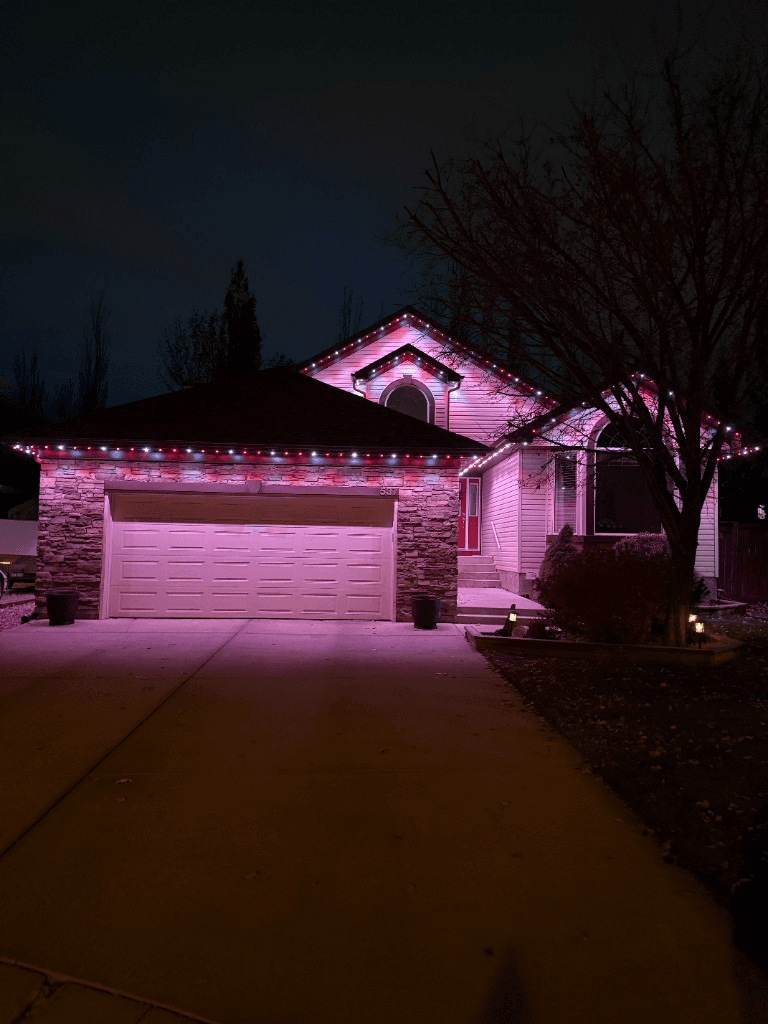 From our gallery
Your permanent outdoor lights are not just for holidays and team colours. They are a security system hiding in plain sight. Bright white LEDs along your roofline, soffits, and eaves create a well lit perimeter that deters intruders, illuminates dark corners, and makes your property visible from the street after dark.
This guide covers the best security lighting designs for permanent outdoor LED systems, three free downloadable patterns with different density levels, how to set them up in the GOULY app, and how to use scheduling, zones, and smart home integration to protect your home 24/7.
For a quick look at how app controlled patterns work, explore our Designs page and the live GOULY app preview.
Why permanent lights work as security lighting
Traditional security lights are motion activated floods that blind everyone and look industrial. Permanent LED lighting takes a completely different approach: consistent, ambient illumination that lights your entire perimeter without the harsh glare.
Here is why it works:
- Full perimeter coverage. Your lights already wrap the entire roofline, soffit, and eaves. Every side of your home is lit
- Always on option. Schedule them to run from dusk to dawn automatically. No motion sensor needed
- Visible from the street. A lit home looks occupied. An unlit home looks empty. It is that simple
- No dark corners. Traditional security lights leave gaps between fixtures. Permanent LEDs are continuous
- Smart home integration. Pair with Alexa or Google Home to trigger lights when a doorbell camera detects motion
- Zero maintenance. No bulbs to replace, no fixtures to adjust, no timers to reset after a power outage
Three security lighting density options
Not every home needs every LED turned on for security. We created three patterns with different on/off spacing so you can pick the brightness and energy level that works for you:
1 On, 1 Off
Every other LED is lit. Provides 50% coverage with a clean, spaced look. Lower energy use while still creating a visible perimeter. Best for homes that want subtle ambient security without full brightness.
2 On, 2 Off
Pairs of lit LEDs with dark gaps between. Balanced brightness and coverage. This is the most popular security pattern because it provides strong illumination without lighting every single node. Best for most homes.
3 On, 3 Off
Clusters of three lit LEDs with dark zones between. Creates brighter pools of light with clear separation. Best for larger homes, acreages, or properties where you want maximum brightness in key areas.
All three patterns use bright cool white for maximum visibility.
Download Security Lighting Patterns
Three density options for bright white security lighting. Pick the spacing that works for your home and scan the QR code to load it into the GOULY app.
Every other LED lit. Maximum spread with 50% coverage. Good for accent security and lower energy use.

How to download
- 1Open the GOULY app
- 2Tap Pattern
- 3Tap the icon (Scan)
- 4Scan this QR code
- 5Click Shared Folder, and Turn On
How to set up security lighting in the GOULY app
Setting up security lighting takes less than five minutes:
- Open the GOULY app and tap your connected lighting system
- Tap Pattern and scan one of the three QR codes above (1 On/1 Off, 2 On/2 Off, or 3 On/3 Off)
- Set brightness to 80 to 100 percent depending on how bright you want the perimeter
- Set a schedule for automatic dusk to dawn operation. The app adjusts for sunset throughout the year so you never have to update it manually
- Save to a folder called "Security" so you can activate it with one tap any time
Pro tip: create multiple security scenes at different brightness levels. Run 60% for everyday evenings and switch to 100% when you are away on vacation.
Security lighting schedules
The GOULY app lets you automate security lighting so you never have to think about it:
Everyday security
Set your lights to turn on at sunset and off at sunrise. The app adjusts automatically as days get shorter and longer throughout the year. Your home is never dark.
Vacation mode
When you are away, run security lights on a varied schedule. Turn them on at sunset, dim to 40% at midnight, brighten back to 80% at 5 AM. Simulates occupancy so your home never looks empty.
Motion triggered (with smart home)
Pair your GOULY system with Alexa or Google Home. When a doorbell camera or motion sensor detects activity, trigger your lights to flash bright white or switch to full brightness. A visible deterrent that neighbours notice. See our home security with smart lighting guide for full smart home setup instructions.
Zone control
Use zone control to light only the areas that matter most:
- Front eave: Always on at 80% from dusk to dawn
- Side eaves: On at 50% until midnight, then off
- Back eave: Motion triggered only
- Garage: Full brightness from dusk to dawn
Security lighting by home style
Bungalow / ranch
One continuous roofline means full perimeter coverage with a single zone. The 2 On/2 Off pattern works best for even coverage.
Two storey / traditional
Multiple roofline levels create layered security lighting. Run the upper eaves at lower brightness and the lower soffits at full brightness for maximum ground level illumination.
Acreage / estate
Multiple zones are essential. Light the main house perimeter at full brightness, garage and outbuildings at 50%, and driveways or pathways with accent zones.
Modern / flat roof
Clean, continuous lighting along flat rooflines looks architectural during the day and provides even security coverage at night. The 1 On/1 Off pattern keeps it subtle.
Security lighting vs traditional options
| Feature | Permanent LED security | Motion flood lights | Solar path lights |
|---|---|---|---|
| Coverage | Full perimeter | Spot coverage | Path only |
| Consistency | Always on (scheduled) | Motion activated only | Solar dependent |
| Visibility from street | High | High (when triggered) | Low |
| Aesthetics | Clean, architectural | Industrial, harsh | Decorative |
| Maintenance | None | Bulb replacement | Battery/panel cleaning |
| Smart home integration | Yes (Alexa, Google) | Some models | No |
| Multi use | Security + holidays + everyday | Security only | Path lighting only |
| Cost after install | $55/year electricity | $30 to $80/year bulbs | $0 (solar) |
The biggest advantage: your permanent lights serve double duty. The same system that runs security white at night runs Christmas candy cane in December, Easter pastels in spring, and team colours on game night. No extra hardware, no extra cost.
Tips for maximum security effectiveness
- Brightness matters. Run security patterns at 80% or higher. Dimmer settings look decorative, not secure
- Consistency beats motion. A home that is always lit looks occupied. A home with motion lights tells an observer that nobody is home until the light triggers
- Light all sides. Front only lighting leaves the back and sides vulnerable. Permanent lights wrap the full perimeter
- Pair with cameras. Security lighting + visible cameras is the most effective deterrent combination
- Tell your neighbours. Let neighbours know your lights are on a security schedule. They will notice if they go off unexpectedly
- Use warm white for everyday, cool white for security. The colour temperature shift signals "security mode" without looking harsh during regular evenings
Common questions about security lighting
- Can permanent lights replace traditional security lights? For perimeter illumination, yes. They provide better coverage than spot floods. For focused task lighting (above a door, garage entry), you may still want a dedicated fixture
- How much does security lighting cost with permanent lights? Nothing extra if you already have a system installed. Security white is just another pattern in the app
- Will security lights raise my electricity bill? The average home runs about $55/year total for permanent lights, including security schedules
- Can I set different zones to different brightness? Yes. The GOULY app supports independent zone control with separate schedules and brightness levels
- Do security lights work in a power outage? The system requires power to operate. Pair with a battery backup or UPS for uninterrupted security lighting
- Can I trigger lights from a smart home device? Yes. The GOULY system integrates with Amazon Alexa and Google Home for voice control and automation triggers. See our Alexa & Google Home setup guide for step-by-step instructions
Ready to light up your home for security and every occasion?
Frequently asked questions
For perimeter illumination, yes. Permanent LED lights provide better, more consistent coverage than spot floods. For focused task lighting above a door or garage entry, you may still want a dedicated fixture.
Nothing extra if you already have a permanent lighting system installed. Security white is just another pattern in the GOULY app. Average annual electricity cost for the entire system is about $55.
The 2 On/2 Off pattern is the most popular for security. It provides balanced brightness and coverage for most homes. For maximum brightness, use 3 On/3 Off. For subtle ambient security, use 1 On/1 Off.
Yes. The GOULY app supports independent zone control with separate schedules and brightness levels. Light the front at 80%, sides at 50%, and back on motion trigger only.
Yes. The GOULY system integrates with Amazon Alexa and Google Home for voice control and automation triggers, including motion sensor and doorbell camera events.
The system requires power to operate. Pair with a battery backup or UPS for uninterrupted security lighting during outages.
Questions before you book?
Visit our FAQ page
Get quick answers on Gen 3 Lighting, pricing, install timelines, app setup, warranty, and what to expect on install day.