The best Calgary Flames outdoor light designs for permanent lighting systems: red, orange, and white colour patterns including our signature 2 Red, 1 Orange, 1
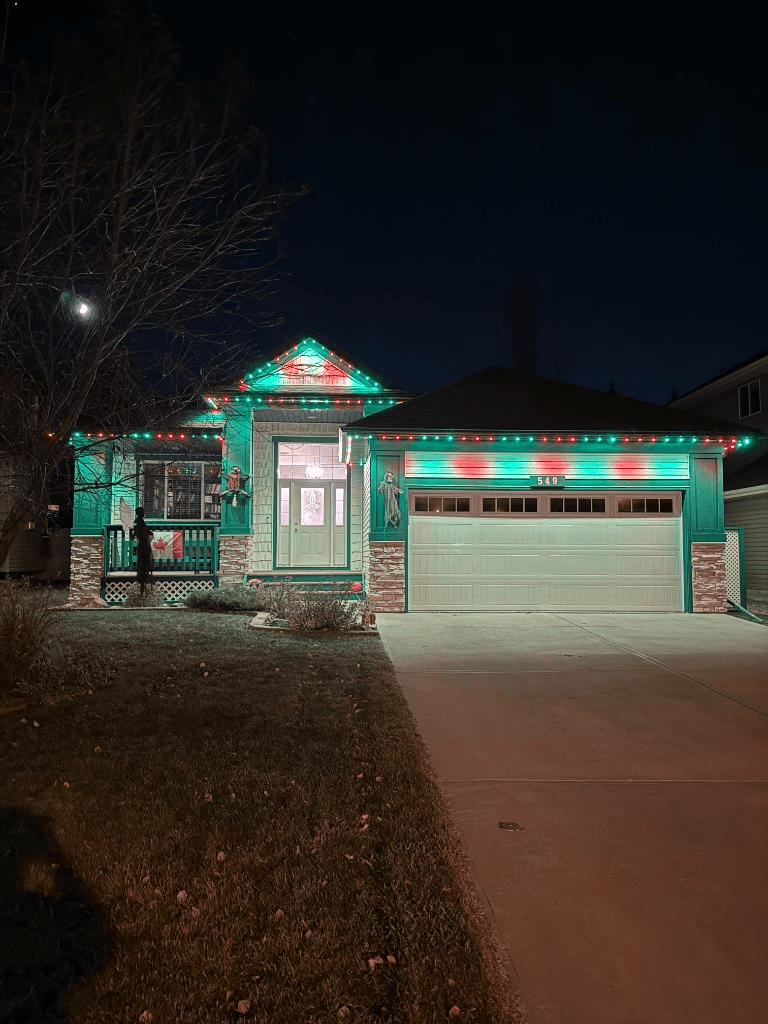 From our gallery
Your permanent outdoor lights already handle Christmas, Halloween, and Canada Day. But game night? That is where Calgary Flames fans turn their entire roofline into a statement. Red, orange, and white blazing across your eave line tells the whole neighbourhood exactly who you are cheering for before puck drop even happens.
This guide covers the best Calgary Flames light designs for permanent lighting systems, including our signature 2 Red, 1 Orange, 1 White pattern (available as a free download), app setup tips, and game day scheduling ideas for every Flames fan in Calgary and surrounding areas.
For a quick look at how app-controlled patterns work, explore our Designs page and the live GOULY app preview.
Why permanent lights are the ultimate game day upgrade
Forget the foam finger. Your house is now the biggest piece of fan gear you own.
- No setup, no teardown. One tap in the GOULY app and your roofline is Flames red, orange, and white. After the game, switch back to warm white or leave it burning all playoffs.
- Visible from the street. Neighbours, dog walkers, and anyone driving past your house will see it. During playoffs, entire streets light up. Your home sets the tone.
- Instant atmosphere. Hosting a watch party? Your exterior lights match the energy before guests even walk through the door. Pair it with interior smart lights and the whole house bleeds Flames colours.
- Works for every game. Regular season, playoffs, Heritage Classic, outdoor games. One saved scene covers them all.
The Calgary Flames colour palette for permanent lights
The official Calgary Flames colours translate perfectly to RGBW permanent lighting:
| Colour | Hex code | GOULY app setting | Role in pattern |
|---|---|---|---|
| Flames Red | #FF0000 | Pure red, 100% brightness | Dominant colour, sets the identity |
| Flames Orange | #FF6600 | Orange, 100% brightness | Accent colour, adds warmth and depth |
| White | #FFFFFF | Cool white, 90% brightness | Clean contrast, keeps the pattern sharp |
The red and orange combination is what separates a Flames display from a generic red roofline. That orange accent is the signature. It says Calgary, not just Canada.
Top Calgary Flames light patterns
These are the most popular Flames-inspired designs homeowners run on permanent lighting systems:
1. The 2 Red, 1 Orange, 1 White (our top pick)
The signature Calgary Flames pattern. Two red nodes, one orange node, one white node, repeating across the entire eave line. It captures the full Flames colour palette in a clean, rhythmic sequence.
- Pattern: Red, Red, Orange, White, Red, Red, Orange, White (repeating)
- Mode: Static
- Best for: Every home style. This is the go-to for Flames fans.
- App setup: Set a repeating 4-node pattern: Red at 100 percent, Red at 100 percent, Orange at 100 percent, White at 90 percent
This is the pattern we recommend to most homeowners. It strikes the perfect balance between the dominant red, the signature orange, and clean white contrast. Download it free below.
2. Red and orange alternating
Simple two-colour alternation. Every other node switches between red and orange.
- Pattern: Red, Orange, Red, Orange (repeating)
- Mode: Static or slow chase
- Best for: Homes with shorter eave runs where the 4-node pattern does not get enough repetitions
- App setup: Two-colour alternating pattern, both at full brightness
3. Flames fire chase
The full red, orange, white palette with a chase animation that makes the colours appear to flicker and move along the roofline like actual flames.
- Pattern: Red, Red, Orange, White (repeating)
- Mode: Chase at 2 to 3 second speed
- Best for: Longer rooflines on two storey and estate homes where the motion effect reads from the street
- App setup: 4-node repeating pattern with chase animation enabled
4. Bold red with orange accents
A dominant red roofline with every fourth node set to orange. Creates a subtle Flames identity without the full multi-colour pattern.
- Pattern: Red, Red, Red, Orange (repeating)
- Mode: Static
- Best for: Homeowners who want a team nod that is slightly more understated
- App setup: Set all nodes to red, then address every fourth node to orange
5. Playoff intensity
All three Flames colours at maximum brightness with a fast chase. This is not subtle. This is for deep playoff runs when subtlety is not the point.
- Pattern: Red, Orange, White (repeating)
- Mode: Fast chase at 1 second speed
- Best for: Playoff games, elimination rounds, and Cup runs
- App setup: 3-node repeating pattern with fast chase enabled
Download Our Calgary Flames Colour Pattern
2 Red, 1 Orange, 1 White repeating pattern. Scan the QR code below to load it directly into your GOULY app.

How to download
- 1Open the GOULY app
- 2Tap Pattern
- 3Tap theicon (Scan)
- 4Scan this QR code
- 5Click Shared Folder, and Turn On
Calgary Flames light designs by home style
| Home style | Recommended pattern | Why it works |
|---|---|---|
| Modern two storey | 2 Red, 1 Orange, 1 White | Bold and clean, the 4-node cycle reads perfectly on sharp architectural lines |
| Bungalow or ranch | Red and orange alternating | Shorter eave runs get more pattern repetitions with a 2-node cycle |
| Craftsman or character | Flames fire chase | Animated warmth complements traditional architecture |
| Estate or luxury | Bold red with orange accents | Understated team identity on larger homes |
| Cabin or mountain style | Playoff intensity | The fast chase adds energy and movement to natural materials |
How to set up a Flames game day scene in the GOULY app
Setting up your Calgary Flames lighting scene takes about 2 minutes:
- Open the GOULY app and navigate to your home profile
- Find the folder you want to edit or create a new one (e.g. "Calgary Flames" or "Game Day")
- Choose your scene from the folder or create a new scene
- Set your pattern to the 2 Red, 1 Orange, 1 White repeating pattern (or scan the QR code above to load it instantly)
- Set the animation mode (static for clean game day look, chase for playoff energy)
- Set a schedule so lights turn on before puck drop and off after the game
Controller / App
Switch patterns in the comfort of your home
Every scene, colour, and schedule runs from your phone, no clips, no climbing.
Most-used scenes
Try the live preview
See colours and patterns before you commit.
Pro tips for Flames game day lighting
- Turn them on early. Set your Flames scene 30 to 60 minutes before puck drop. Let the neighbourhood know it is game night.
- Use full brightness. Red and orange look best at 100 percent. These are bold, saturated colours that demand full power.
- Drop white to 90 percent. Slightly softer white blends better with the warm red and orange instead of looking stark.
- Chase mode for playoffs. Static works for regular season, but when the stakes go up, turn on chase mode. The moving colours add energy that matches the intensity.
- Save it as a folder. Create a "Calgary Flames" folder in the GOULY app. Save your game day scene and a playoff scene so you can switch between them in seconds.
- Leave them on after a win. Let the whole street know. Switch off after a loss. That is just how it works.
Calgary Flames vs other team colours on your home
If you run Flames colours, you already have the palette for several other occasions:
| Occasion | Colours | How it compares to Flames |
|---|---|---|
| Calgary Flames | Red, orange, white | The original. Bold, warm, and unmistakable. |
| Canada Day | Red, white | Drop the orange, keep the red and white. Same scene minus one colour. |
| Christmas | Red, green, white | Swap orange for green. Your red nodes stay exactly where they are. |
| Halloween | Orange, purple, green | Your Flames orange carries over. Add purple and green for October. |
| Valentines Day | Red, pink, white | Same red base, softer accent colours. |
The beauty of permanent lights is that switching between these takes seconds. Your Flames folder lives right beside your Christmas folder, your Canada Day folder, and your everyday warm white.
Game day lighting schedule ideas
Smart scheduling means your lights are ready before you even sit down on the couch:
| Scenario | Schedule suggestion |
|---|---|
| Regular season home game | Turn on 1 hour before puck drop, off at midnight |
| Regular season away game | Turn on at sunset, off at midnight |
| Playoff game | Turn on at noon, keep them on all night after a win |
| Battle of Alberta | Turn on as early as possible. Leave them on all day. All night. |
| Off-season | Switch to warm white or summer colours, Flames folder stays saved |
Hosting a Flames watch party
Your permanent lights set the scene before anyone walks through the door:
- Exterior presence. Red, orange, and white roofline tells arriving guests they are in the right place. "The house with the Flames lights" is the easiest directions you will ever give.
- Backyard screen nights. If you are projecting the game outside, the Flames-lit roofline creates a stadium atmosphere in your own yard.
- Pair with interior lighting. Set smart bulbs inside to red and orange for a fully immersive game day experience from driveway to living room.
- Intermission light show. Switch to chase mode during intermissions for some extra energy, then back to static for gameplay.
Every NHL team colour pattern on your home
One of the biggest advantages of RGBW permanent lights is that you are never locked into one team. Here are popular NHL team patterns that work on permanent lighting:
| Team | Primary colours | Pattern suggestion |
|---|---|---|
| Calgary Flames | Red, orange, white | 2 Red, 1 Orange, 1 White (repeating) |
| Edmonton Oilers | Blue, orange | Alternating blue and orange |
| Vancouver Canucks | Blue, green, white | 2 Blue, 1 Green, 1 White |
| Toronto Maple Leafs | Blue, white | Alternating blue and white |
| Montreal Canadiens | Red, blue, white | Red, White, Blue (repeating) |
| Winnipeg Jets | Blue, white, red | 2 Blue, 1 White, 1 Red |
| Ottawa Senators | Red, black, gold | Red, Gold, Red, Gold |
Every team pattern is a folder in the GOULY app. Save as many as you want and switch between them instantly.
Battle of Alberta: Flames vs Oilers lighting
When Calgary plays Edmonton, the stakes are higher and so is the lighting game. Here is how to make your position clear:
- Full Flames pattern. 2 Red, 1 Orange, 1 White at maximum brightness. No subtlety.
- Chase mode on. Let those colours move. Static is for the regular season. Battle of Alberta demands animation.
- Start early. Turn your Flames lights on the morning of the game. Let the Oilers fans in your neighbourhood see it all day.
- Keep them on after a win. This is non-negotiable.
If your neighbour has permanent lights too, the street becomes a visual battleground. Red and orange versus blue and orange. That is what permanent lights were made for.
Beyond game day: year-round transitions
Your Flames folder sits in the GOULY app alongside every other occasion. Here are natural transitions:
- Flames to warm white (everyday curb appeal between games)
- Flames to Canada Day red and white (drop the orange for July 1st)
- Flames to Halloween orange and purple (your Flames orange carries right over)
- Flames to Christmas red, green, and white (swap orange for green)
- Flames to Stampeders red and white (CFL season, same red base)
One tap to switch. No ladder, no clips, no storage boxes. Just pure fandom on demand.
Cost of running Flames game day lights
If you already have a permanent lighting system installed, running Calgary Flames scenes costs nothing extra. There is no new hardware, no game day surcharge, no seasonal add-on. You use the same system you use for Christmas, Canada Day, and everyday curb appeal.
If you do not have permanent lights yet, a Flames-ready system is the same as any other permanent lighting install:
| Home type | Typical installed range | Flames ready? |
|---|---|---|
| Bungalow (~150 ft) | $2,500 to $3,000 | Yes, RGBW with full app control |
| Two storey (150 to 200 ft) | $3,000 to $4,000 | Yes, RGBW with full app control |
| Large or estate home (250 to 400 ft) | $4,000 to $5,000 (larger estates quoted individually) | Yes, RGBW with full app control |
Every system we install includes RGBW nodes with individually addressable control. Flames red, Flames orange, Christmas green, Halloween purple, and everyday warm white are all included from day one.
Questions Calgary Flames fans ask about permanent lights
- Can I really match the exact Flames colours? Yes. RGBW permanent lights produce over 16 million colours. The GOULY app colour wheel lets you dial in the exact Flames red (#FF0000) and Flames orange (#FF6600) precisely.
- Will my Flames pattern work on any home size? Yes. The 2 Red, 1 Orange, 1 White pattern repeats across any eave length. It reads clearly on bungalows, two storeys, and estate homes.
- Can I schedule my lights for game time automatically? Yes. Set a schedule in the GOULY app to turn on before puck drop and off at a set time. You can also trigger scenes manually with one tap.
- Can I save both Flames and Oilers patterns? Technically yes. The app does not judge. But your neighbours might.
- Do the lights work during playoffs when I am too nervous to touch my phone? Yes. Set a schedule or leave the scene running. The lights handle themselves so you can focus on the game.
Ready to light up your home for game day and every occasion?
Frequently asked questions
The Calgary Flames colours for permanent outdoor lights are red (#FF0000), orange (#FF6600), and white (#FFFFFF). The most popular pattern is 2 Red, 1 Orange, 1 White repeating across the roofline.
Yes. Any RGBW permanent lighting system with app control can produce the exact Flames red, orange, and white. You switch designs in the GOULY app without any new hardware or installation.
Open the GOULY app, create a new scene, and set a repeating 4-node pattern: Red, Red, Orange, White. Or scan the QR code in this article to load the pattern directly into your app.
Yes. Set a schedule in the GOULY app to turn your Flames scene on before puck drop and off at a set time. You can also trigger it manually with one tap.
No. If you already have a permanent lighting system with RGBW nodes, Flames scenes are free. You just create a new scene in the app using your existing hardware.
Questions before you book?
Visit our FAQ page
Get quick answers on Gen 3 Lighting, pricing, install timelines, app setup, warranty, and what to expect on install day.