First-person upgrade story: two winters with a cheap LED strip and the Magic Home Pro app, every failure mode by season, an honest comparison table, and what
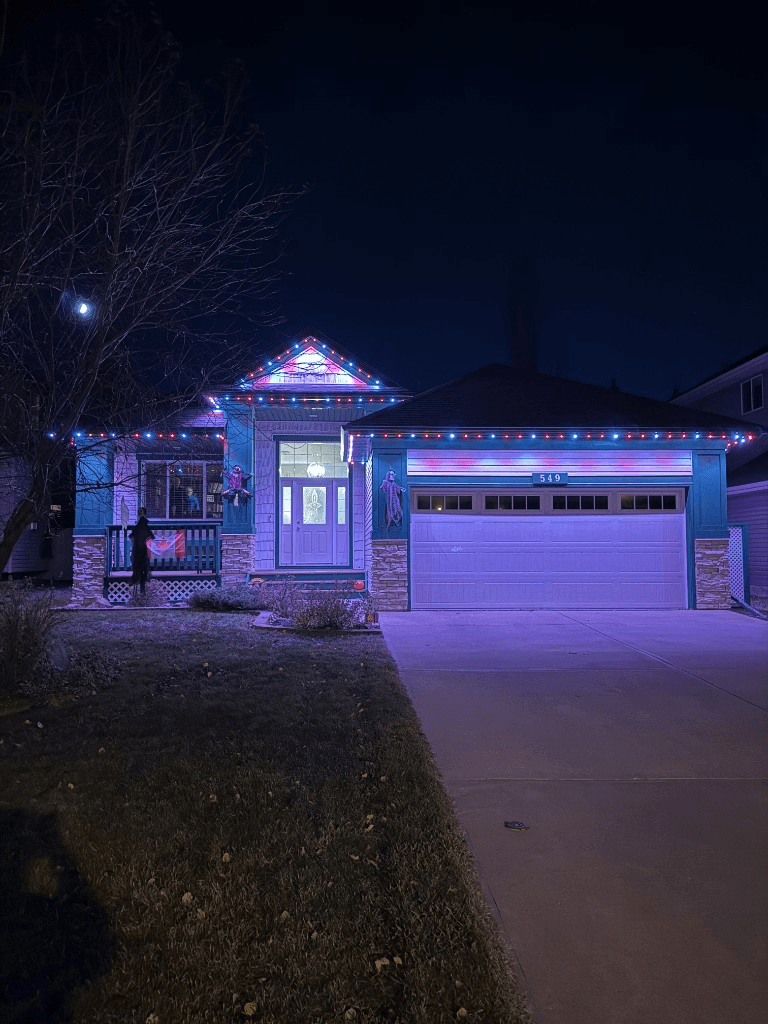 From our gallery
Every year we get quotes from homeowners running cheap RGB LED strips with the Magic Home Pro app. The pattern is so consistent we can usually guess the timeline before they finish the story: bought the strip for under $80 on a marketplace, installed it themselves in an afternoon, got one good Christmas out of it, started losing the app and the adhesive in winter two, called us in spring of winter three.
This guide walks through the comparison the way we walk through it on a quote call: what the cheap LED strip + Magic Home Pro setup actually delivers, where it breaks, what a permanent lighting system does differently, and the real cost difference over a decade. If you are reading this in front of a Magic Home Pro app that will not connect, or you are about to click "buy" on a roll of LEDs for your eaves, this is the conversation we would have at your kitchen table.
Why the cheap strip is tempting in the first place
Honest take, because we get this question on almost every quote and we do not want to pretend the appeal is not real.
- Price. A 50 ft kit ships for $58 to $120. A 50 ft run of professionally installed permanent lights is in the thousands. That gap is real.
- App control. Magic Home Pro looks the same in screenshots as the apps on professional systems. RGB sliders, scene presets, schedule timers, music sync. On paper it offers most of what a real install offers.
- DIY pride. One person, one afternoon, no installer to schedule, no crew on the roof.
- Reversibility. If you hate it, the adhesive backing comes off and the strip goes in the trash. No fascia screws, no commitment.
- "It is just for Christmas." That is the line most strip buyers tell themselves. Once the lights are up, it almost never stays just for Christmas.
If any of those apply to you, that is a fair calculation. The trouble is that most of those advantages do not survive contact with an Alberta winter or a Louisiana summer. Here is what typically happens.
Year one: the honeymoon
The first season usually goes fine. The strip runs along the front fascia of a bungalow or a two-storey, the adhesive holds in cool October air, the Wi-Fi controller pairs with Magic Home Pro after two or three tries, the kids see a red-and-green chase pattern on Christmas Eve and the homeowner feels like a wizard.
Then January arrives. In Calgary we routinely see -28 °C with a windchill in the -30s. In Lake Charles it is a January cold snap that pushes a Gulf-Coast home well below what the adhesive was rated for. Some part of the strip — usually a centre run of 8 to 15 feet — goes black mid-pattern while the rest of the strip keeps chasing colours like nothing happened.
Three things are happening that the marketplace listing did not mention.
- The adhesive backing fails in cold. 3M VHB-style tape is rated for a specific temperature range. Below freezing, especially below -20 °C, the adhesive hardens and stops bonding. The strip starts peeling off the fascia in long sagging loops that fill with snow.
- The "waterproof" IP rating is for water, not ice. A silicone-coated IP65 strip can shed rain. It cannot survive a freeze-thaw cycle where meltwater seeps under the silicone, expands inside the LED housing, and pops the solder joints.
- A single-channel strip is a single point of failure. Strip lights are wired in series. When one segment dies, every LED downstream of it dies too. There is no redundancy.
Most strip owners ride out the rest of the season with a stretch of dead house in the middle of the display, and in March, when the snow lets up, they climb back on the ladder to assess the damage.
Year two: the slow death
We skip the diary and summarize, because the year-two story rhymes from house to house.
- Spring: Re-glue sagging sections with outdoor silicone caulk. Looks rough. Visible from the street. Holds for about three weeks.
- Summer: First UV-related colour shift. The "white" channel on the strip starts running pink. The silicone coating yellows on south-facing exposures.
- Late summer: Magic Home Pro pushes an app update and breaks compatibility with the controller. Two evenings on Reddit, a third evening factory-resetting, then the device finally re-pairs.
- Fall: The controller stops holding its Wi-Fi association. Every morning the homeowner opens the app, waits for a timeout, and re-pairs. Sometimes ten or more tries.
- October: A power surge during a thunderstorm takes out the cheap brick power supply. A $22 replacement from Amazon ships next day. The replacement runs hot enough to melt the plastic clip it is zip-tied to.
- November: Individual LEDs along the strip start dropping out. Not segments, just random pixels going dark.
- December: Run the whole thing one more time for Christmas, with patches of dead LEDs, an unstable app, and a sketchy replacement power supply. Looks fine from a distance and embarrassing up close.
By January of year two, most people are done. That is when the quote calls land.
The honest comparison every strip owner should run first
This is the table we wish more homeowners would build before they ever click "add to cart." All values are observed in our service area, plus the published specs of a permanent system.
| Factor | Cheap LED strip + Magic Home Pro | Permanent lights (GOULY Gen 3) |
|---|---|---|
| Upfront cost (50 ft) | ~$60 to $120 + your time | ~$2,500 to $3,000 installed |
| Realistic outdoor lifespan | 1 to 3 seasons | 50,000+ hours (17+ years at 8 hrs/day) |
| Weatherproofing | IP65 silicone, fails in freeze-thaw | Fully sealed RGBW pucks, UV-protected, surge-protected |
| Cold tolerance | Adhesive fails below -20 °C, solder joints crack | Designed for -40 °C Alberta winters |
| Brightness | ~300 lumens per 5 m on full white | ~25 to 40 lumens per RGBW puck, bright and even across long runs |
| Mounting | Adhesive tape, then caulk, then prayer | Screwed aluminum hat-track colour-matched to fascia |
| Wiring | Series circuit, one failure kills the line | Parallel circuit, individual puck replacement |
| App | Magic Home Pro, 2.5 star App Store rating | GOULY app, purpose-built, no subscription |
| Wi-Fi reliability | Frequent disconnects, manual re-pairing | Stable Wi-Fi + Bluetooth fallback, 2.4 GHz setup |
| Daytime appearance | Sagging silicone strip, visible cable | Nearly invisible track when off |
| Warranty | None to 30 days from the marketplace seller | Multi-year manufacturer + installer warranty |
| Install effort | A ladder, an afternoon, every year | One install day, never again |
| 10-year total cost | $300 to $600 in replacement strips + your time | One-time install, $0 after |
1-3 seasons
Realistic outdoor life of a cheap LED strip
50,000+ hrs
Rated life of a GOULY RGBW puck
~$4-5/mo
Electricity to run permanent lights 6 hrs/night
The number that usually ends the debate is the 10-year total. A typical strip-owner who runs the system honestly for a decade — original kit, one or two replacement strips, a replacement power supply, outdoor caulk, a partial strip to patch dead segments — lands around $300 to $600 in hard cash, plus the time. That is more than enough to question whether the cheap version was actually cheap.
Where Magic Home Pro itself adds to the problem
We single out the app here because the app is what most upgrade searches start with. Nobody searches "my LED strip silicone yellowed in UV." They search "Magic Home Pro not connecting" or "Magic Home Pro alternative."
Magic Home Pro is a generic controller app written to talk to a huge variety of cheap unbranded Wi-Fi LED controllers sold under dozens of names. That is the design reality, and it is the reason for the 2.5 star App Store rating. The app is not built for a single product; it is built for an entire category of barely-compatible hardware, and there is no single developer with the incentive to fix bugs that only affect one batch of one factory's controllers.
Common complaints we hear at quotes:
- Lights reset themselves in the middle of the night and start cycling colours
- Devices "disappear" from the app and require a full re-pair
- Schedules silently stop firing after a router reboot
- The app sends notifications it should not, or fails to send the ones it should
- 2.4 GHz only, with no clear setup help on a 5 GHz mesh network
- Music sync that lags by 200 to 400 milliseconds, which is enough to look broken
If you are troubleshooting any of those today, the underlying problem is not something you missed in the settings. The hardware and the software were never engineered together, and no amount of fiddling can change that.
What permanent install day actually looks like
The single biggest worry strip-owners bring to a quote call is the install itself. They picture a multi-day disruption with crews on their roof and bills creeping up as we "find issues." Here is the honest play-by-play for a typical Number One Lights install on a single-storey bungalow, start to finish.
8:30 a.m. The crew arrives with the truck. We walk the perimeter and confirm run lengths, fascia material, the colour-match for the aluminum hat-track, and where the certified control box will mount. If the homeowner has pulled their old LED strip, we patch the adhesive marks with mineral spirits. If they have not, we do it.
9:15 a.m. Track installation starts. The track screws into the fascia with stainless screws at a spec interval. No drilling into shingles, no adhesive on the painted fascia, no clamping onto eavestrough. The track is pre-cut to the home's linear footage with corner pieces.
11:00 a.m. Track is up. Pucks drop into the channel one by one and click into place. They are individual, replaceable, and connect through sealed quick-disconnects.
12:30 p.m. Lunch break for the crew.
2:00 p.m. Control box mounts in the garage, wired into a dedicated 15-amp circuit with surge protection. Cable runs are tucked behind the fascia and into the soffit, no visible drop down the wall.
3:30 p.m. First power-on. Every puck lights white at 50%. The crew walks the perimeter looking for cold pucks or alignment issues.
4:00 p.m. App walkthrough. We set up the GOULY app on the homeowner's phone, walk through scene selection, schedules, Wi-Fi pairing, and how to update firmware. We show how to swap an individual puck if one ever fails — about 30 seconds, no tools.
4:45 p.m. Crew packs up. No mess in the yard, no fasteners on the lawn, no holes in the fascia. Just a clean line of track and a working app.
One day, start to finish. Two-storey or estate homes can run into a second morning, but most installs are wrapped before the homeowner is back from work. For the longer breakdown by home type, see the installation day guide.
What customers tell us 12 months in
We follow up with most installs at the 12-month mark. The numbers are consistent enough that we can write them down with confidence.
- Failed pucks: typically zero. Parallel-circuit design means a single puck failure does not cascade, and individual pucks are warrantied and trivial to swap.
- Unplanned app disconnects: typically zero. Most homeowners only lose the system when they deliberately reset their router. It re-pairs automatically when the network is back.
- Cold-snap performance: Calgary installs ran straight through the -36 °C night in January 2026 without a flicker. Lake Charles installs held through the hurricane-season power blips in fall 2025.
- Daytime appearance: Colour-matched track disappears against the fascia. Several neighbours of clients have asked, six months in, when the lights were going to be installed.
- Holidays used in year one: Christmas, New Year's Eve, Valentine's Day, St. Patrick's Day, Easter, Canada Day or July 4th, plus birthdays and date nights. None of those holidays are covered by string lights left in a bin until December.
- Electricity: Utility bills tick up by about $4 to $6 per month during heavy-use months. That lines up with the energy efficiency guide.
The single best thing customers tell us is that they forget the system is there until they want to use it. That was never true with the Magic Home Pro setup. One install, every holiday — and the lights themselves stay out of the way.
When permanent lights might NOT be the right call
Honest take, because we get this question and the answer is not always "buy permanent."
- You rent. Permanent install needs to live on a building you own. Strips peel off in spring.
- You are selling within 12 months. The warranty is transferable, but the math gets tighter on a short hold.
- One-feature accent only. A single railing, one tree trunk, the underside of a deck step — strips are made for this.
- Genuinely indoor or sheltered. Under-cabinet, behind a TV, inside a covered porch ceiling. Indoor lifespans are real.
- Strict budget under $300 right now and lights have to be up this December. Buy the strip, get through the season, save for the permanent install in a future year. No shame in the staged approach.
If you are in one of those buckets, the cheap strip is the right call for now. Bookmark this page and come back when the situation changes.
What we tell customers in your spot
If you are running a Magic Home Pro setup right now and the strips have already failed once, here is the order of operations we would suggest.
- Do not put another season into it. If the strip failed once it will fail again, in a worse way, in the next freeze-thaw or UV-heavy summer. Sunk cost is sunk.
- Do not buy a "better" strip. A more expensive strip is still a strip. Adhesive mounting, series wiring, and a generic Wi-Fi controller are inherent to the format. You cannot solve them by spending more inside the same category.
- Get a real quote. It is cheaper than most strip owners think. Quotes are free, take about 60 seconds to request, and you will know whether the number is in your budget before any installer sets foot on your property.
- Look at the whole system, not just the app. A permanent install is hardware, software, wiring, mounting, and warranty as one engineered package. The app is the easy part. The hardware is the part that has to survive 17 winters.
For a no-pressure technical overview before talking to anyone, what are permanent lights is the starting point, and the system breaks down every component of the install.
The bottom line
A cheap LED strip with the Magic Home Pro app is a great way to test the concept of app-controlled exterior lighting. It is a difficult way to live with it, and a worse way to keep paying for it season after season.
Cost-wise, the break-even against a real install lands inside three to four years, and after that it is free. Time-wise, it is the end of the annual ladder routine. Visually, it is the difference between an obvious peeling silicone strip and a clean roofline that disappears in daylight.
Ready to find out what a permanent install would cost on your house? Get a free quote — a team member will view your home virtually and deliver a clear, honest quote. No pressure, no surprises.
Frequently asked questions
In practice, 1 to 3 seasons. The silicone coating yellows under UV, the adhesive backing fails below freezing, and freeze-thaw cycles crack the solder joints inside the strip. A permanent RGBW puck system is rated for 50,000+ hours, or about 17 years at 8 hours per night.
Magic Home Pro is a generic app written to control hundreds of different unbranded Wi-Fi controllers. The hardware and software are not engineered together, so reliability depends on whichever no-name controller you happened to buy. It is the main reason the app sits at a 2.5 star rating.
For most homeowners staying in their home 3+ years, yes. A one-time permanent install breaks even against repeated strip replacements plus your time within 3 to 4 years, and after that it is free. You also gain year-round use, app stability, no ladder work, and a real warranty.
A more expensive strip is still a strip. The adhesive mounting, the series wiring, and the generic Wi-Fi controller are inherent to the format and they all fail outdoors over time. A permanent system uses parallel-wired individual pucks in screwed aluminum track, which is a fundamentally different and more durable design.
Typically one day. The installer removes any old strip residue, mounts the colour-matched aluminum hat-track, drops in the RGBW pucks, wires the certified control box, and walks you through the GOULY app. Most homes are done from morning to late afternoon with no follow-up visit.
A typical 50 to 200 foot permanent install runs $2,500 to $4,000 installed. Cheap LED strips cost $50 to $100 per kit but need replacement every 1 to 3 seasons. Over 10 years, strip lights cost $300 to $600 in materials plus 100+ hours of your time, while a permanent install is one payment with $0 after.
Questions before you book?
Visit our FAQ page
Get quick answers on Gen 3 Lighting, pricing, install timelines, app setup, warranty, and what to expect on install day.